Omagenda
A calendar that lives in the Omarchy bar on Linux. A rolling three-week grid, a year view, a day agenda, and your events in a plain JSON file on your own machine — with optional two-way Google Calendar sync.
What it is
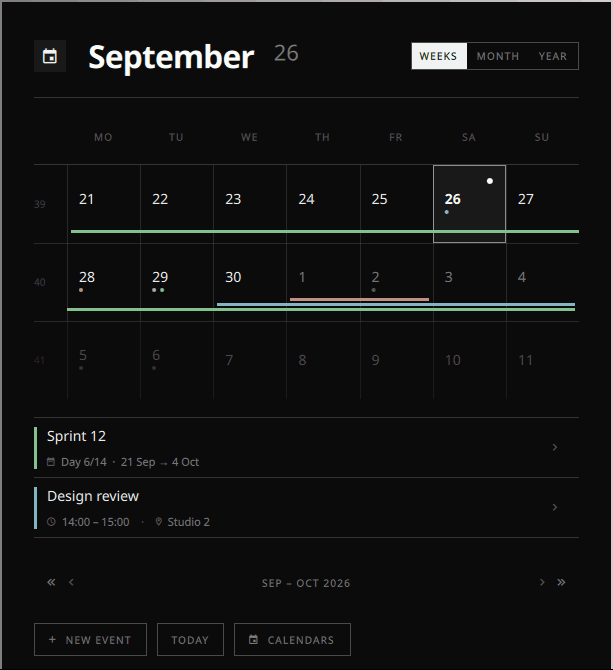
Omagenda is a plugin for Omarchy, a Linux desktop built on Hyprland. It adds a calendar widget to the status bar, and a popup behind it.
- A rolling grid of the week you are in and the two ahead, which expands to a whole month, or twelve miniatures for the year.
- A day agenda, with pages to read, create, edit and delete events.
- Multi-day events as bars drawn across the days they cover, stacked in lanes when they overlap.
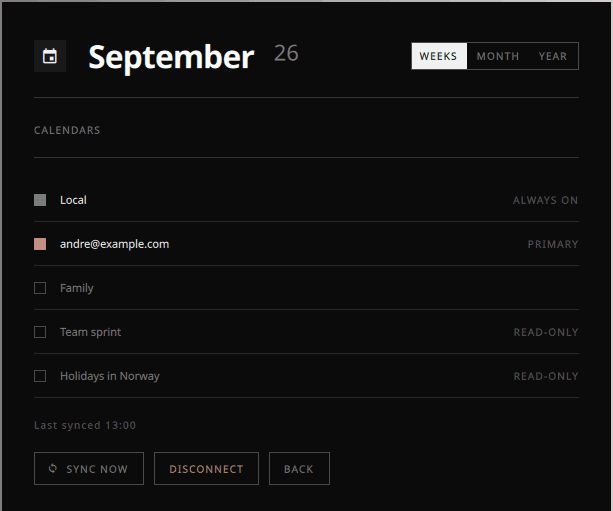
- Colour by calendar, derived from your desktop theme so it never fights the rest of the screen.
- Events stored in
~/.config/omagenda/events.json— watched, and hand-editable.
Google Calendar
Sync is optional. Omagenda is fully usable without it, and without a Google account at all. If you turn it on, it works both ways: your Google events show in the bar, and events you create in Omagenda land in Google.
Connecting is one button — CALENDARS → SYNC WITH GOOGLE CALENDAR. Your browser opens once, you grant access, and your primary calendar starts syncing. Any other calendar on the account is a row you click to add. There is no API key to find and nothing to paste.
What Omagenda asks for, and why
| Scope | Why Omagenda needs it |
|---|---|
calendar.events | To read your events so the grid, the bar and the agenda can show them, and to create, edit and delete events when you do so in Omagenda. A calendar app that could not write would not be a calendar app. |
calendar.calendarlist.readonly | To list the calendars on your account so you can choose which ones to show. Without it Omagenda could not offer you the choice. |
Omagenda deliberately does not request the broad calendar scope: it cannot create, rename or delete a calendar, only the events inside one.
Your data stays on your machine. Omagenda talks to Google's API directly from your computer. There is no Omagenda server, no account to make here, and no copy of your calendar anywhere but your own disk and Google's. Read the privacy policy.
Install
Omagenda is an Omarchy plugin — a git clone into your plugins directory, with nothing to compile and no dependencies beyond Python 3, which Omarchy already has.
git clone https://github.com/Neaxic/omagenda \
  ~/.config/omarchy/plugins/omagenda
omarchy restart shell
Then add the widget to your bar from Omarchy's settings. The full documentation, including how to connect Google and how to bring your own OAuth client if you would rather, is in the repository.
Open source, and no promises
Omagenda is MIT licensed. Every line that touches Google — the OAuth flow, token refresh and the API calls — is in a single readable Python file, bin/gcal, written against the standard library alone, so you can audit exactly what leaves your machine.
It is also a hobby project, given away free and as-is, with no warranty and no support. Keep an authoritative calendar elsewhere and keep your own backups — see the terms of service.